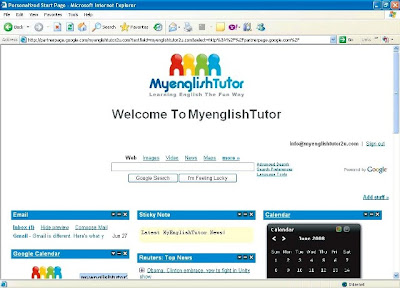
MyenglishTutor Google Apps brings together essential services to help schools, tution centres and students communicate and collaborate more effectively. These services are powerful, easy to set up, require no maintenance, and you get them for free. Everything is unified by the Start Page, a central place for you to preview your inboxes and calendars, access your essential content, and search the web.
MyenglishTutor Google Apps Start Page - The Start Page lets you create a unique, dynamic place to preview your Gmail inbox, your Google Docs files and your Google Calendar, collect relevant information from MyenglishTutor, and search the web.
Central access point - Create a place for users to preview their inboxes and calendars, access relevant content from MyenglishTutor, and search the web.
Custom content - Choose from Google's broad selection of gadgets for your page or create your own gadgets. After users log in, they can further personalise the Start Page so it's justright by adding, removing, customising and rearranging gadgets.
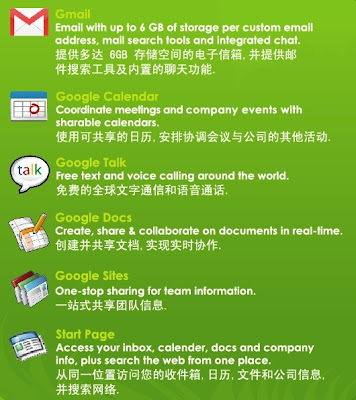
Gmail comes with helpful features to make email more useful, like award-winning spam and virus filtering, up to 6GB of storage per account, powerful search to find messages as fast as you can search the web, and instant messaging built right in. The Gmail web application is accessible from anywhere, and you can even sign in from your mobile phone. Or if you prefer,you can access email from your favourite mail client like Outlook or Thunderbird using POP or IMAP at no additional cost.
Powerful mail search tools - With Gmail, the power of Google search is available for your inbox. Find saved messages instantly, even if you don't keep your mail organised.
Integrated instant messaging - See who's online and instant message with them in real-time, right within the mail browser window. Chat conversations are saved and searchable, just like email conversations.
Integrated calendar features - Gmail recognises meeting requests and invitations, and helps you RSVP without ever leaving your inbox.
Google Calendar - Google Calendar helps students and teachers manage their time.
Not only can you organize your personal calendar, invite others to meetings and events, and keep track of RSVPs, but you can also create shared calendars that multiple people can view or edit. You always control who has access, whether it's just yourself, your team, or your entire school.
Sharing is built-in - Invite others to meetings and track responses, share entire calendars with your contacts, or make your public event information available to the world.
Integrated contact list - Your contact list in Google Calendar is always in sync with Gmail, so you'll never need to look someone up in Gmail to send an invitation.
Integrated into Gmail - Gmail recognises incoming meeting requests and invitations, and helps you RSVP without ever leaving your inbox.
Google Talk - Google Talk provides a free and simple way to connect instantly with your contacts with instant messaging and free PC-to-PC voice calls anywhere in the world. You can even exchange files with your contacts using Google Talk, with no file size restrictions.
Free PC-to-PC voice calls (VOIP) - You can talk to anyone else who's online and has the Google Talk client. The person on the other end can be anywhere in the world, and you can talk for as long as you want for free. If your contacts aren't online when you want to chat, you can leave a voicemail.
Real-time file transfers and text messaging - Send files and text messages to your contacts. There are no file size or bandwidth restrictions.Integrated into Gmail - Instant messaging is built right into Gmail, so you can see who's online and instant message with them in real-time, right within the mail browser window. Chat conversations can be saved and searched, just like email conversations.
 Google Docs - Google Docs makes creating and collaborating on documents, spreadsheets, and presentations simple.
Create and edit your own docs, and give students and teachers access to your online files. Everyone shares the same online copy of each doc, so you can avoid the inconvenience of keeping track of attachments when people make changes. You always control who has access, whether it's just yourself, your team, or your entire class.
Online document creation - Create new documents from scratch, or upload saved documents from your computer. Edit your documents from any internet-connected computer.
Sharing without managing attachments - Co-workers share the same online copy of each doc, so no one needs to sort out multiple versions of the same attachment.
Revision history - Individual edits are kept so you can see who added and deleted what, when.
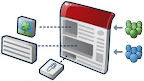 Google Sites - Google Sites is the easiest way to make information accessible to people who need quick, up-to-date access. People can work together on a Site to add file attachments, information from other Google applications (like Google Docs, Google Calendar, YouTube and Picasa), and new free-form content. Creating a site together is as easy as editing a document, and you always control who has access, whether it's just yourself, your team, or your whole school.No HTML required - Creating a Google Site is as easy as editing a document, which means there's no markup language for you to learn -- just get started. Upload files and attachments - Use the file cabinet to upload files up to 10MB in size. Each Google Apps account receives at least 10GB of storage in Google Sites. Work together and share - Our permission settings let you designate owners, viewers and collaborators (meaning they can edit pages) for your site.